Showing posts with label Data Binding. Show all posts

Dynamically Templated GridView with Edit, Delete and Insert Options ( VB.NET Version)

Quite a while back I wrote an article titled “Dynamically Templated GridView with Edit, Delete and Insert Options” on aspalliance.com in which I provided complete solution to build a GridView with template fields generated at run time with in-place Insert, Delete and Edit operations. I also gave complete description to implement ITemplate interface effectively. Before writing this article I googled a lot for such a solution for my university project but I could not find any, then I had to go for my own form scratch. When I came up with this and used it in my project successfully I thought to share it with complete description.

During this period where I received lot of appreciation mails for providing this ready to use piece of functionality, I also got many mails for its VB.NET version but unfortunately I could not find time to do so. Now I have converted it into VB.NET and have also done small refactoring for ADO.NET logic.  You can download both versions from following links.


Download VB.NET Version
Download C-Sharp Version

Persisting jsTree changes in Database

In my last posts I demonstrated how you can bind  jsTree with  database in ASP.NET MVC. In this post I'll  demonstrate following actions on jsTree nodes and save the changes in database in ASP.NET MVC.

  • Moving a node/Changing order (changing employee’s manager)
  • Adding a new node (adding new employee under a manager)
  • Renaming a node (Changing name of an employee)
  • Deleting a node (Removing an employee from the hierarchy)

Please note that jsTree has “callback” option attribute to define the callbacks required to achieve these tasks. It exposes several callbacks which can be used as per needed. Here are the different callbacks we’ll have to implement.

$("#empgraph").tree({
        data: {
            type: "json",
            url: "/Home/GetHiearchicalNodesInfo",
            async: true
        },
        rules: {
            //ommitted for brevity
        },
        callback: {  //skeleton of all required callbacks
             onmove: function(NODE, REF_NODE, TYPE, TREE_OBJ, RB) { },
             oncreate: function(NODE, REF_NODE, TYPE, TREE_OBJ, RB) { },
             ondelete: function(NODE, TREE_OBJ, RB) { }
             onrename: function(NODE, LANG, TREE_OBJ, RB) { }
        }
 });

Before implementing these callbacks we should know what information we require to be sent to server to perform these actions. Lets have a look on these actions one by one.

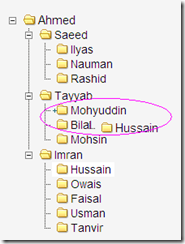
Moving Nodes/Changing Order of Nodes

image

To save the changed hiearchy we need node’s id and its parent’s id. onmove call back has several arguments , three of which NODE , REF_NODE and  TYPE are important to note, NODE has the reference of the moving node, REF_NODE is the one  it is moving toward. When TYPE will be “inside”, REF_NODE will be its parent node. Lets implement this.

onmove: function(NODE, REF_NODE, TYPE, TREE_OBJ, RB) {
    var parent_id = 0;

    if (TYPE === "inside") {
        parent_id = $(REF_NODE).attr('id');
    }
       saveHiearchy(NODE.id, parent_id);
    }

After getting child (node) id and parent, simply call a method that could make a POSt request on sever to save this changed information in database.


function saveHiearchy(node_id, parent_id) {
    var actionUrl = "/Home/SaveHiearchy?childId=" + node_id + "&parentId=" + parent_id;
    $.ajax(
        {
            type: "POST",
            url: actionUrl,
            data: null,
            dataType: "json",
            success: function(data) {
            },
            error: function(req, status, error) {
            }
        });
}  

Adding a new node

image

To create a node we need node’s parent’s id and the name of the node. oncreate callback also has the same arguments as onmove had, in this case hwe again require NODE , REF_NODE and TYPE  to create a new node as the following code shows.

oncreate: function(NODE, REF_NODE, TYPE, TREE_OBJ, RB) {
    var parent_id = 0;

    if (TYPE === "inside") {
        parent_id = $(REF_NODE).attr('id');
    }
    createNode(NODE, parent_id);
}

It is interesting to note when you when you’ll create a node, oncreate will fire and a node with name “New Folder” will be created in database. When you will enter your required name , the onrename will be called to update the previously saved name.. But to achieve this we have to send the newly created node’s id from server back to client and on onsuccess of  oncreate callback we have to save this id in some global variable to be used in rename callback; createdNodeId  is being assigned the id. Please note createNode node method gets the name associated with the node and passes the information to server.


function createNode(NODE, parentId) {
    var folderName = $(NODE.innerHTML).filter("a")[0].innerText;
    var actionUrl = "/Home/CreateFolder?folderName=" + folderName + "&parentId=" + parentId;
    $.ajax(
        {
            type: "POST",
            url: actionUrl,
            data: null,
            dataType: "json",
            success: function(data) {
                createdNodeId = data.nodeId;
            },
            error: function(req, status, error) {
            }
        });
}


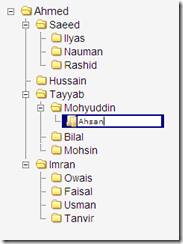
Renaming a node
image

Renaming a node requires its id and the changed name. This information can be available as shown below.


onrename: function(NODE, LANG, TREE_OBJ, RB) {
    renameNode(NODE.id, $(NODE.innerHTML).filter("a")[0].innerText);
  }


Since this method also gets called when a new node is created; it is the case when node id is empty so use the createdNodeId otherwise it will have node id.

function renameNode(nodeId, nodeNewTitle) {
    if ($.trim(nodeId) == "")
    nodeId = createdNodeId;

    var actionUrl = "/Home/RenameNode?nodeId=" + nodeId + "&nodeNewTitle=" + nodeNewTitle;
    $.ajax(
        {
            type: "POST",
            url: actionUrl,
            data: null,
            dataType: "json",
            success: function(data) {
            },
            error: function(req, status, error) {
            }
        });
}


Deleting a node

image


Deleting a node is the simplest case, in this case we just need id of the node to be deleted.

ondelete: function(NODE, TREE_OBJ, RB) {
            deleteSubNode(NODE.id);
        }

The related ajax routine


function deleteSubNode(nodeId) {
    var actionUrl = "/Home/DeleteSubNode?folderId=" + nodeId;
    $.ajax(
    {
        type: "POST",
        url: actionUrl,
        data: null,
        dataType: "json",
        success: function(data) {
        },
        error: function(req, status, error) {
        }
    });
}

Here is the complete jsTree code, with callbacks implemented.

$("#empgraph").tree({
            data: {
                type: "json",
                url: "/Home/GetHiearchicalNodesInfo",
                async: true
            },
            ui: { theme_name: "classic" },
            rules: {
                metadata: "mdata",
                use_inline: true,
                clickable: ["all"],
                deletable: ["all"],
                renameable: ["all"],
                creatable: ["all"],
                draggable: ["all"],
                // dragrules: ["child * child", "child inside root", "tree-drop inside root"],
                createat: ["top"],
                drag_button: "left",
                droppable: ["tree-drop"]
            },

            callback: {

                onmove: function(NODE, REF_NODE, TYPE, TREE_OBJ, RB) {
                    var parent_id = 0;

                    if (TYPE === "inside") {
                        parent_id = $(REF_NODE).attr('id');
                    }
                    saveHiearchy(NODE.id, parent_id);
                },
                onrename: function(NODE, LANG, TREE_OBJ, RB) {
                    renameNode(NODE.id, $(NODE.innerHTML).filter("a")[0].innerText);
                },
                oncreate: function(NODE, REF_NODE, TYPE, TREE_OBJ, RB) {
                    var parent_id = 0;

                    if (TYPE === "inside") {
                        parent_id = $(REF_NODE).attr('id');
                    }
                    createNode(NODE, parent_id);
                },
                ondelete: function(NODE, TREE_OBJ, RB) {
                    deleteSubNode(NODE.id);
                }
            }
        });

Here are the corresponding controller actions, they can be implemented with your own data access layer or LINQ or any type ORM.


public ActionResult SaveHiearchy(string childId, string parentId)
{
    JsTreeDAO.SaveNodeRelationship(childId,parentId);

    return null; //you may return any success flag etc
}
 public ActionResult RenameNode(string nodeId, string nodeNewTitle)
 {
     JsTreeDAO.RenameNode(nodeId, nodeNewTitle);

     return null; //you may return any success flag etc
 }

 public JsonResult CreateFolder(string folderName, string parentId)
 {
     int newNodeId = JsTreeDAO.AddSubNode(parentId, folderName);

     return Json(new { nodeId = newNodeId });//id of newly created node is required for rename callback.
 }

 public ActionResult DeleteSubNode(string folderId)
 {
     JsTreeDAO.DeleteSubNode(folderId);

     return null; //you may return any success flag etc
 }

Please note that I have not provided the details of the DAO class being used here and also have not used LINQ in these examples just to keep things simple because LINQ does not have direct equivalent for "Hierarchy" common table expression, otherwise we would have to resort to LINQ extensions.

Hope this helps.

Binding JsTree with Database in ASP.NET MVC

In my  previous post I demonstrated how to bind jsTree programmatically with a collection/array of objects using JSON. In this post I’ll reuse the same logic to map jsTree node anatomy on server side entity and will populate that entities from database. That , in turn will be converted to JSON and sent to client side to bind with jsTree. I’ll demonstrate this in ASP.NET MVC.

First you need to setup jsTree with required files in your ASP.NET MVC project as shown below .

 image


I’ll bind jsTree with a self referencing table for example an Employee, where an employee can also be manager of another employee. To keep it as simplest as possible there are only three fields in the table , ID . Name and ManagerId as shown below.

imageHere is sample data in the table to be displayed. You can see from the data the table is self referencing i.e.  ManagerId of an employee is ID of another employee

  image


With bottom up approach next step is to setup Model with a method that could return a DataSet  to the controller action. I am not using LINQ in this post , I have added a class named jsTreeDAO in the model that uses ConnectionManager, a utility class for data access . I am not showing its definition here. Its quite simple to implement, you can also wirte your own ADO logic in the method.

public static DataSet GetEmployeeHiearchicalInfo()
  {
    DataSet ds = new DataSet();
    try
    {
        SqlCommand cmd = new SqlCommand();
        cmd.CommandText = @"WITH Hierarchy(ManagerId, EmpId, level, Name) AS (
            SELECT ManagerId, Id, 0, Name FROM Employee
            where ManagerId Is Null UNION ALL SELECT dt.ManagerId, dt.Id, level + 1, dt.Name FROM Employee 
            dt INNER JOIN hierarchy h ON dt.ManagerId = h.EmpId) 
            select * from Hierarchy";

        cmd.CommandType = CommandType.Text;
        //ConnectionManager is a utility class written for handling connection and exectue commands.
        ConnectionManager.Execute(cmd, ref ds);
    }
    catch (SqlException)
    {
        throw;
    }
    catch (Exception)
    {
        throw;
    }
    return ds;
 }


The important point to note in above method is the SQL query  which uses Common Table Expression (CTE)  a new feature in SQL Server 2005 for building an hierarchal view of  the data. For more details about CTE ,please refer to this article. 

Lets Add a controller Action that  would call the model’s method. You need to add a controller first ,say its  EmployeeController add an Action with name GetEmployeesHiearchicaInfo as shown below.

public JsonResult GetEmployeeInfo()
  {
    DataSet dsNodes = JsTreeDAO.GetEmployeeHiearchicalInfo();
    DataTable tableNodes = dsNodes.Tables[0];
    DataRow parentDr = tableNodes.Rows[0];

    JsTreeNode rootNode = new JsTreeNode();
    rootNode.attributes = new Attributes();
    rootNode.attributes.id = Convert.ToString(parentDr["EmpId"]);
    rootNode.attributes.rel = "root" + Convert.ToString(parentDr["EmpId"]);
    rootNode.data = new Data();
    rootNode.data.title = Convert.ToString(parentDr["Name"]);

    rootNode.attributes.mdata = "{ draggable : true, max_children : 100, max_depth : 100 }";

    PopulateTree(parentDr, rootNode, tableNodes);


    return Json(rootNode);
  }

This method is quite self explanatory. First it gets DataSet having employee info then it sets all info for the root node from the first data row, then it passes both rootNode and parentRow to another method that binds all info recursively for its children. The definition of method is shown below.

public void PopulateTree(DataRow dataRow, JsTreeNode jsTNode, DataTable tableNodes)
{
    jsTNode.children = new List();
    foreach (DataRow dr in tableNodes.Rows)
    {

        if (dr != null)
        {
            if (Convert.ToInt32(dr["level"]) == Convert.ToInt32(dataRow["level"]) + 1
                        && Convert.ToInt32(dr["ManagerId"]) == Convert.ToInt32(dataRow["EmpId"])
                        )
            {

                JsTreeNode cnode = new JsTreeNode();
                cnode.attributes = new Attributes();
                cnode.attributes.id = Convert.ToString(dr["EmpId"]);
                cnode.attributes.rel = "folder" + Convert.ToString(dr["EmpId"]);
                cnode.data = new Data();
                cnode.data.title = Convert.ToString(dr["Name"]);

                cnode.attributes.mdata = "{ draggable : true, max_children : 100, max_depth : 100 }";

                jsTNode.children.Add(cnode);


                PopulateTree(dr, cnode, tableNodes);

            }
        }
    }
}

Now we have to add a view named Employee to display employee information coming from database using jsTree. The View  markup is quite simple just add a div to which you want to attach the jsTree as shown below.

<%@ Page Language="C#" MasterPageFile="~/Views/Shared/Site.Master" Inherits="System.Web.Mvc.ViewPage" %>
<asp:Content ID="aboutTitle" ContentPlaceHolderID="TitleContent" runat="server"%>
Employee Graph
</asp:Content>
<asp:Content ID="aboutContent" ContentPlaceHolderID="MainContent" runat="server"%>
<div id="employeeGraph" %>
</div>
</asp:Content%>

Now we have to setup jsTree which will call the controller method asynchronously to load and bind data as shown below.


<script type="text/javascript">
$(function() {
    $("#foldergraph").tree({
        data: {
            type: "json",
            url: "/Home/GetEmployeeInfo",
            async: true
        },
        ui: { theme_name: "classic" },
        rules: {
            metadata: "mdata",
            use_inline: true,
            clickable: ["all"],
            deletable: ["all"],
            renameable: ["all"],
            creatable: ["all"],
            draggable: ["all"],
            dragrules: ["child * child", "child inside root", "tree-drop inside root"],
            createat: ["top"],
            drag_button: "left",
            droppable: ["tree-drop"]
        }

    });
});

</script>

Its also mentioned in my last post that the rules{} configuration is optional, only you have to set data aggregate attributes of the jsTree .

must need to set Async=true for asynchronous JSON data load form server.

Have a look on the output.

image


In these two  posts i just focused on only jsTree data binding, in upcoming posts I will show you how you can drag drop, create, delete nodes and persist the changes in database


Hope this helps.


Mahr

Binding jsTree programmatically with server side entities using JSON in ASP.NET

jsTree is very useful jQuery based javascript component for displaying contents
in tree structure in hierarchical manner. In this small example I’ll give you a
demonstration how you can bind jsTree programmatically with sever side data using
JSON.
Before going for implementation first have a look on the format of JSON input
to create nodes.
json:  [   { attributes:  { id: "root1", rel: "root" }, 
        state: "open", data: "Root node 1", 
        children: [    { attributes: { id: "root1_child1", rel: "folder" }, 
         data: { title: "Custom icon", icon: "../images/ok.jpg" } 
      }, 
//.. . other nodes 
  ]

And here is the entity based implementation of a jsTree node.
using System;
using System.Collections.Generic;
using System.Linq;
using System.Web;

public class JsTreeNode
{
    public JsTreeNode()
    {
    }
    Attributes _attributes;
    public Attributes attributes
    {
        get
        {
            return _attributes;
        }
        set
        {
            _attributes = value;
        }
    }
    Data _data;
    public Data data
    {
        get
        {
            return _data;
        }
        set
        {
            _data = value;
        }
    }
    string _state;
    public string state
    {
        get
        {
            return _state;
        }
        set
        {
            _state = value;
        }
    }
    List _children;
    public List children
    {
        get
        {
            return _children;
        }
        set
        {
            _children = value;
        }
    }

}
public class Attributes
{
    string _id;

    public string id
    {
        get
        {
            return _id;
        }
        set
        {
            _id = value;
        }
    }
    string _rel;

    public string rel
    {
        get
        {
            return _rel;
        }
        set
        {
            _rel = value;
        }
    }
    string _mdata;

    public string mdata
    {
        get
        {
            return _mdata;
        }
        set
        {
            _mdata = value;
        }
    }
}

public class Data
{
    string _title;

    public string title
    {
        get
        {
            return _title;
        }
        set
        {
            _title = value;
        }
    }

    string _icon;

    public string icon
    {
        get
        {
            return _icon;
        }
        set
        {
            _icon = value;
        }
    }
}


As you can see the JSON , jsTree expects is collection nodes each having following
structure
{  attributes: { id: "pjson1_5", rel: "root2" },  data: "Root node 2" }

where state and children are optional fields to be set. Keeping the above anatomy
of jsTree node , we can creat server side class to have one-one mapping with these
json objects with composition/aggregation as  per needed so that we can bind
it with node collection populated from sever side. Lets create the main jsTreeNode
and other entities which compose its anatomy as shown above.
< The jsTreeNode is capable to fully map the jsTree json type node. And now its time to populate the jsTreeNode coollection bind the JsTree with it.
using System;
using System.Collections.Generic;
using System.Linq;
using System.Web;
using System.Web.UI;
using System.Web.UI.WebControls;
using System.Web.Script.Serialization;

public partial class _Default : System.Web.UI.Page
{
    protected void Page_Load(object sender, EventArgs e)
    {
        if (!IsPostBack)
        {
            RouteCallbacks();
        }
    }
    void RouteCallbacks()
    {
        string callback = Request.Params["callback"];
        if (string.IsNullOrEmpty(callback))
            return;

        if (callback == "GetNodesJson")
            this.GetNodesJson();
    }
    void GetNodesJson()
    {
        List nodesList = new List();
        for (int i = 1; i < 10; i++)
        {
            JsTreeNode node = new JsTreeNode();
            node.attributes = new Attributes();
            node.attributes.id = "rootnod" + i;
            node.attributes.rel = "root" + i;
            node.data = new Data();
            node.data.title = "Root node:" + i;
            node.state = "open";

            node.children = new List();

            for (int j = 1; j < 4; j++)
            {
                JsTreeNode cnode = new JsTreeNode();
                cnode.attributes = new Attributes();
                cnode.attributes.id = "childnod1" + j;
                node.attributes.rel = "folder";
                cnode.data = new Data();
                cnode.data.title = "child node: " + j;
                cnode.attributes.mdata = "{draggable : true,max_children : 1,max_depth : 1 }";
                node.children.Add(cnode);

            }
            node.attributes.mdata = "{draggable : false,max_children : 1, max_depth :1}";
            nodesList.Add(node);
        }
        JavaScriptSerializer ser = new JavaScriptSerializer();
        string res = ser.Serialize(nodesList);
        Response.ContentType = "application/json";
        Response.Write(res);
        Response.End();
    }
}
 
Following is the client side complete code snipet required to bind jsTree with the server side entities based JSON data. Please dont forget to add jQuery and jsTree related js files reference to your page. The "rule{}" configuration is optional. It is only required if you want your jsTree to be all ***able.
<script type="text/javascript">
      $(function() {
            $("#divJsTreeDemo").tree({
            data: {
            type: "json",
            url: "Default.aspx?callback=GetNodesJson",
            async: true

            },

            rules: {
            metadata: "mdata",
            use_inline: true,
            clickable: ["root2", "folder"],
            deletable: "none",
            renameable: "all",
            creatable: ["folder"],
            draggable: ["folder"],
            dragrules: ["folder * folder", "folder inside root", "tree-drop inside root2"],
            drag_button: "left",
            droppable: ["tree-drop"]

            }
          });

      });

    </script>

Following is the page markup.
    <form id="form1" runat="server">
    <div id="divJsTreeDemo">
    </div>
    </form>

Here it is, Have a look. image Hope this helps. For more about jsTree please visit its website.